
Kallen. Better mobility starts with a measurement.
Kallen works like an AI physical therapist: it takes your history, measures how you move and builds a plan for mobility, posture and pain. Follow-up tests track your progress, and the plan changes with them.
No account. Your data is stored on your phone.
Scan the code with your phone camera. It opens the App Store or Google Play.
Move freely. Stand taller.
- 89
- guided exercises
- 34
- movement tests
- 24
- care protocols
- 0
- accounts needed
In short
What Kallen is
Kallen is a mobility and posture app for iPhone and Android. It works like an AI physical therapist: it takes your history, measures your range of motion, builds a plan and checks your progress with follow-up tests. Kallen is for people who want to stay fit and simply move more, for athletes, for people in rehab who exercise between appointments, and for anyone who spends the day at a desk. Posture photos and camera-measured range-of-motion tests build your Movement Profile: body-region statuses, ranges in degrees, differences between sides and a pain history. Kallen uses that profile to build a plan for stiff hips, ankles and upper back, forward head posture and rounded shoulders, side-to-side differences, and neck, back or knee pain. The AI coach reads the profile before every reply, and you approve or reject each proposed plan change. There are no accounts and no cloud sync. Your profile, plan and pain journal stay on the phone, and our server keeps no copy. Photos and coach context go to the server only while they are being analyzed. The app is free to download. Kallen Pro removes the weekly limit on new scans and re-tests.
How it works
FIG. 01
From measurement to plan in three steps.
Your results stay in your phone’s own storage, with no account or cloud sync.
01
Scan and intake
Take posture photos and answer questions about pain, work, training and goals, covering the same areas as an in-clinic intake.
02
Movement Profile
Kallen organizes body-region statuses, ranges in degrees, differences between sides and your pain history.
03
A plan that follows your results
A new test, answer or scan can change the plan. You approve every proposed change before it takes effect.
The app
See Kallen in action.
From the body map to a 40-second break during your workday. These are real app screens, with no mockups or “coming soon” features.
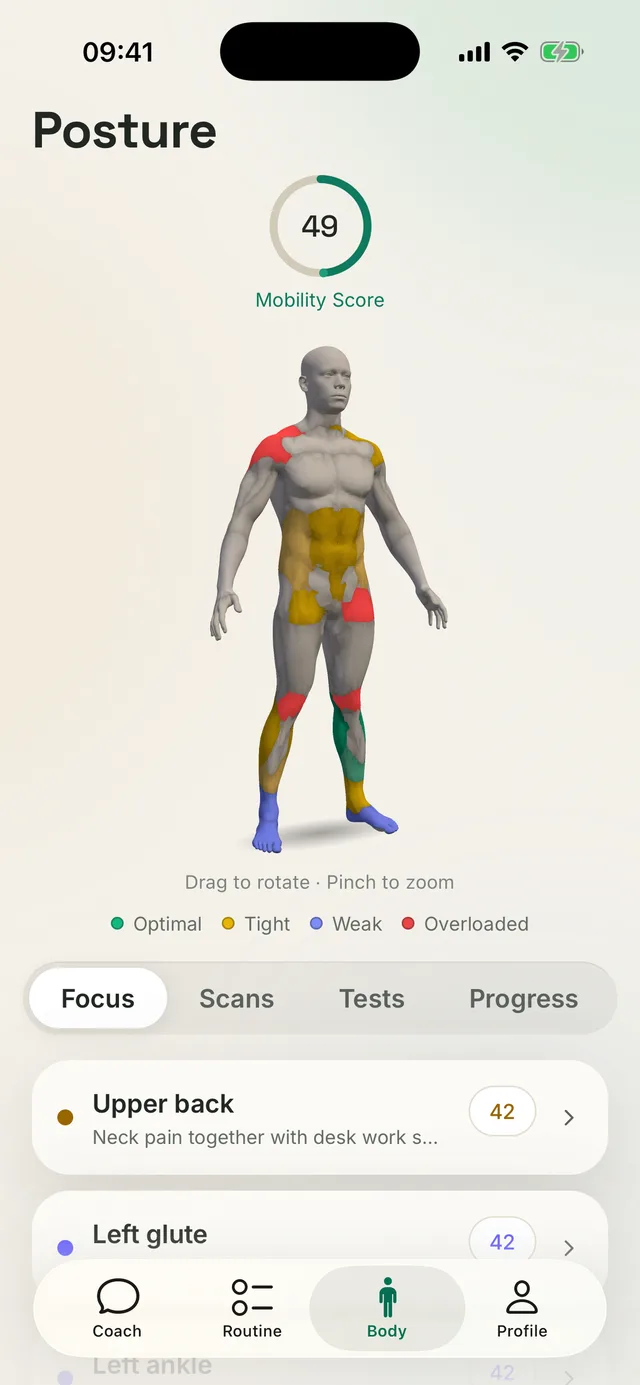
01Body map
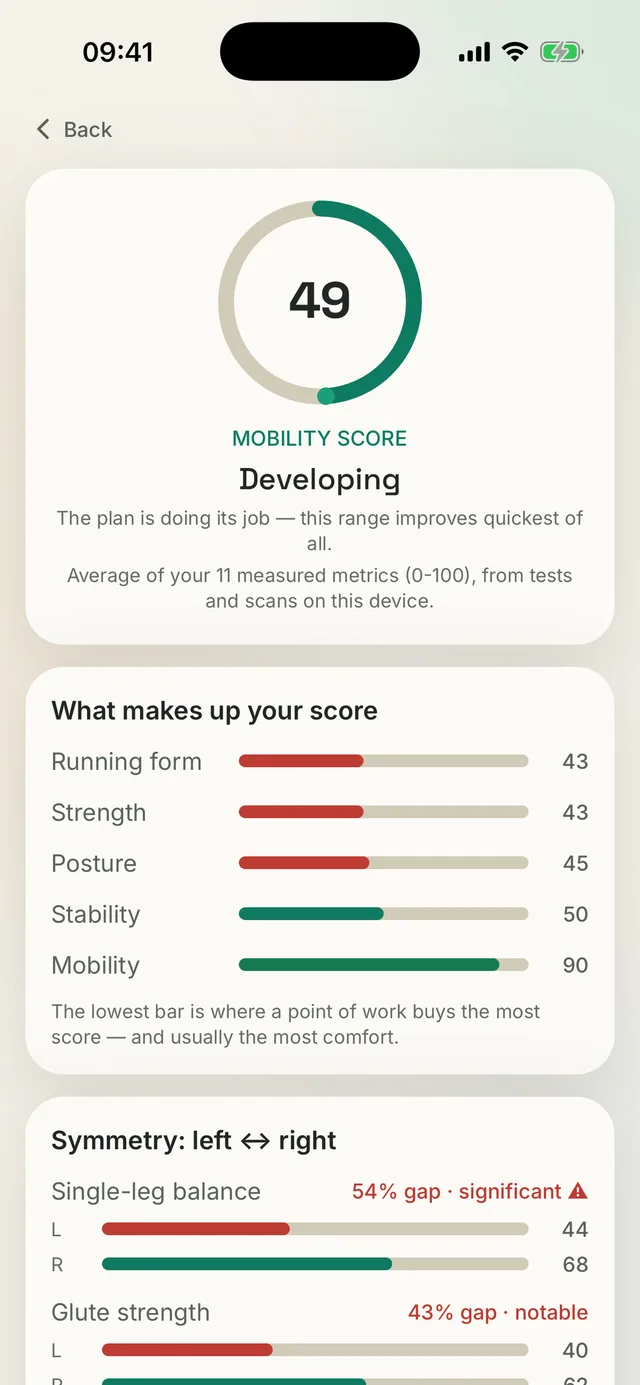
02Mobility score
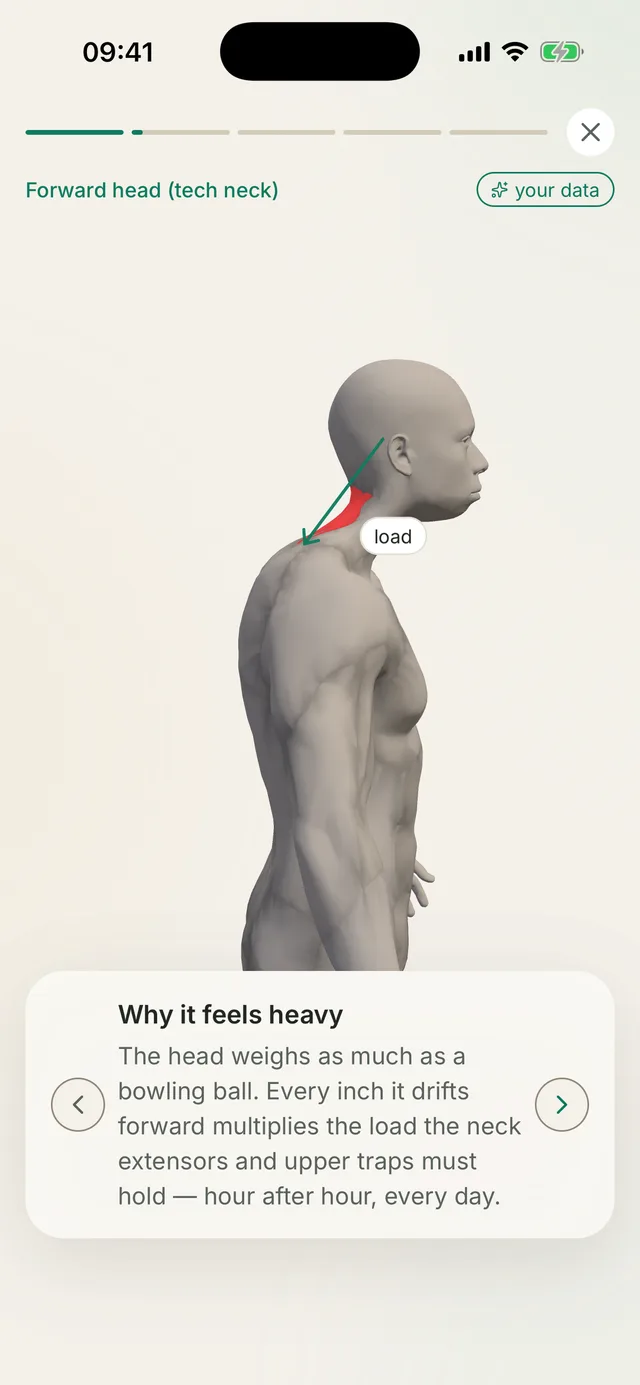
03Posture story
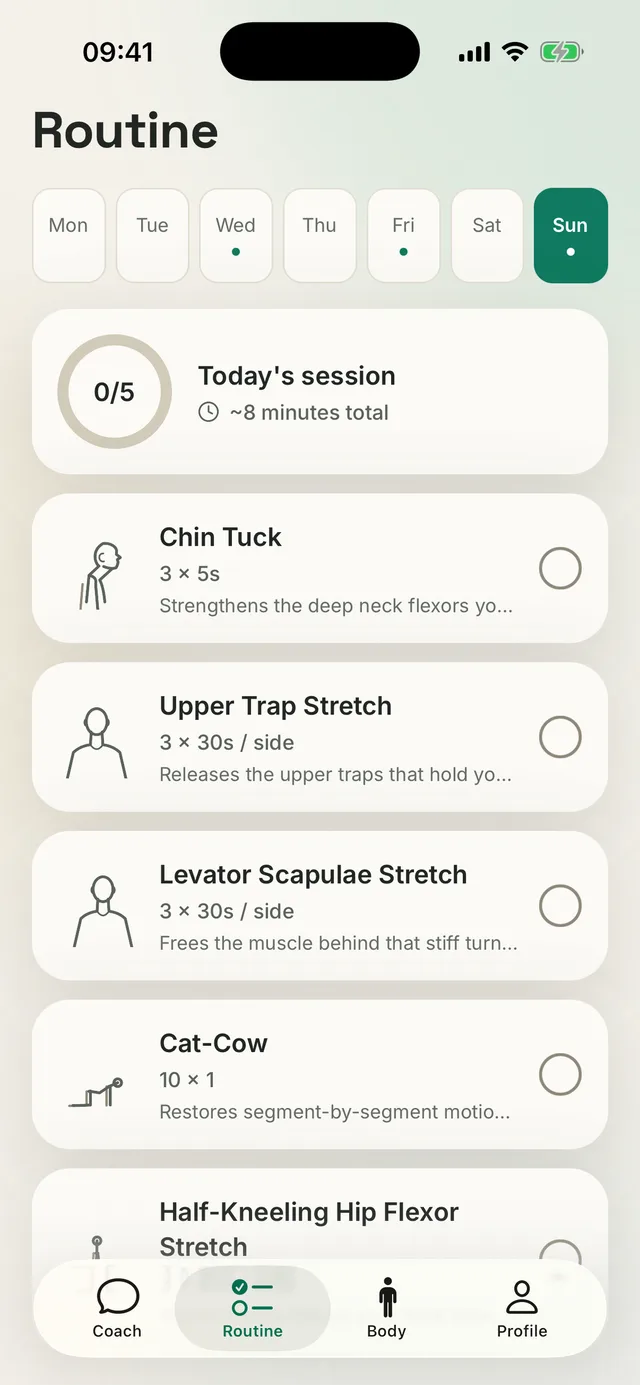
04Daily routine
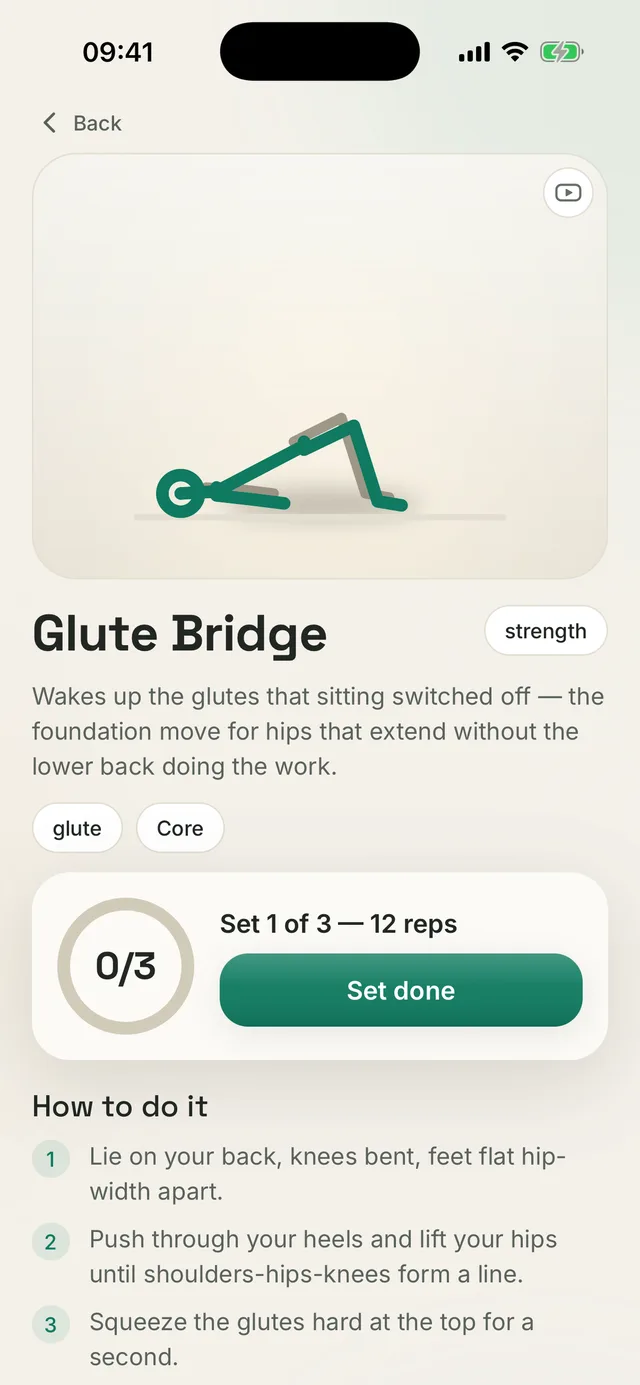
05Exercise guide
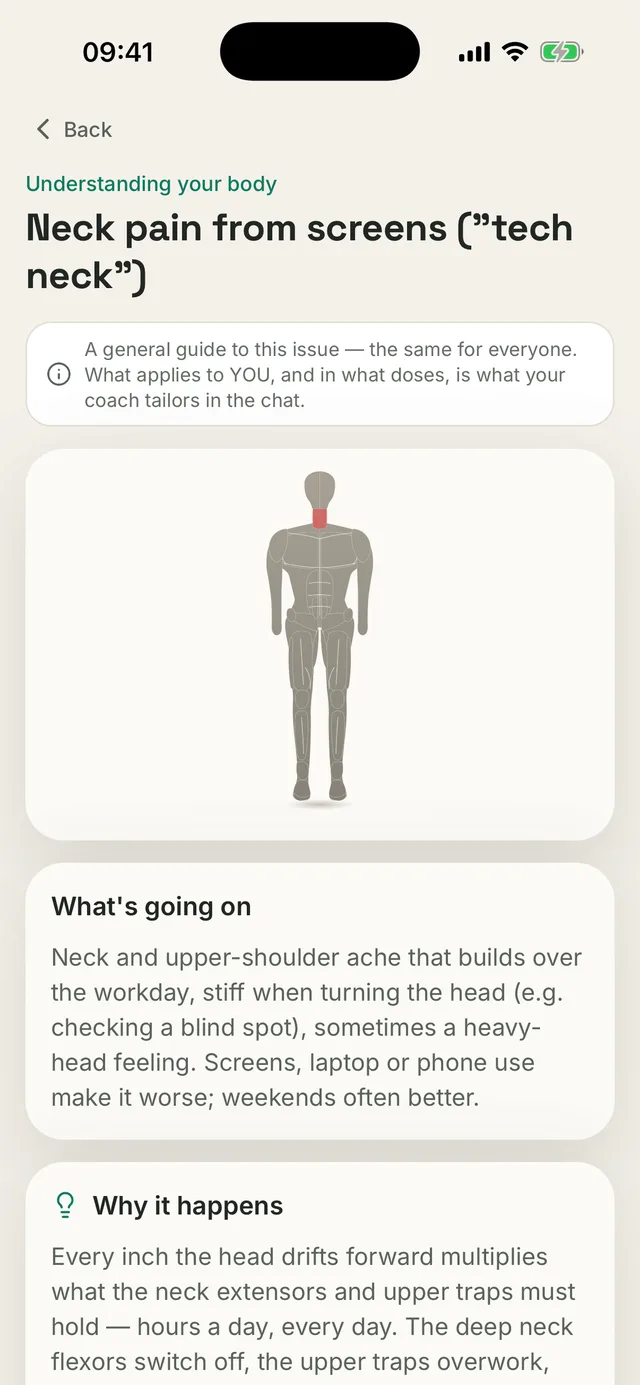
06Protocol
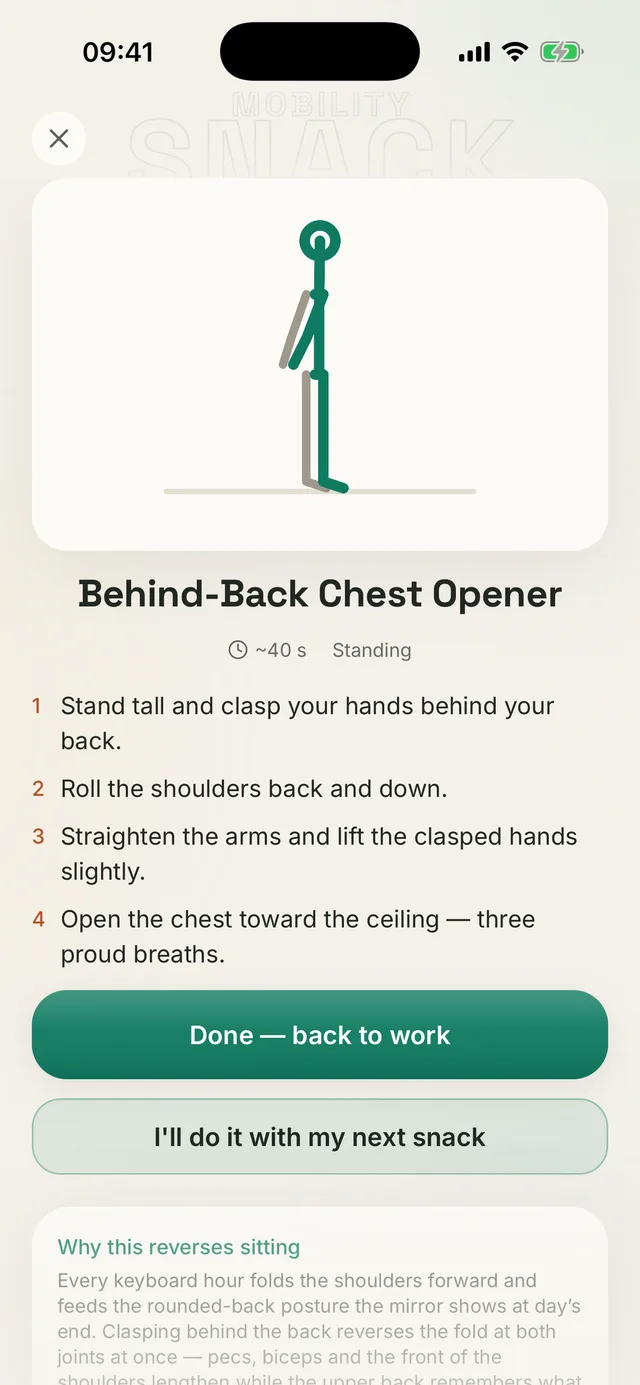
07Mobility Snack
Measurement
FIG. 02
Numbers, not impressions.
Some tests measure angles from the camera image; you complete the others with a guide and timer. For one-sided movements, Kallen records the left and right separately. A mirror cannot show that difference, yet it often reveals where to start.
Ankle bend · typical range 30–45°
Single-leg balance
54% gap, significant
L 44
R 68
Glute strength
43% gap, notable
L 40
R 62
Ankle mobility
L 80
R 96
Sample reading. Your numbers will differ.
Posture analysis
FIG. 02b
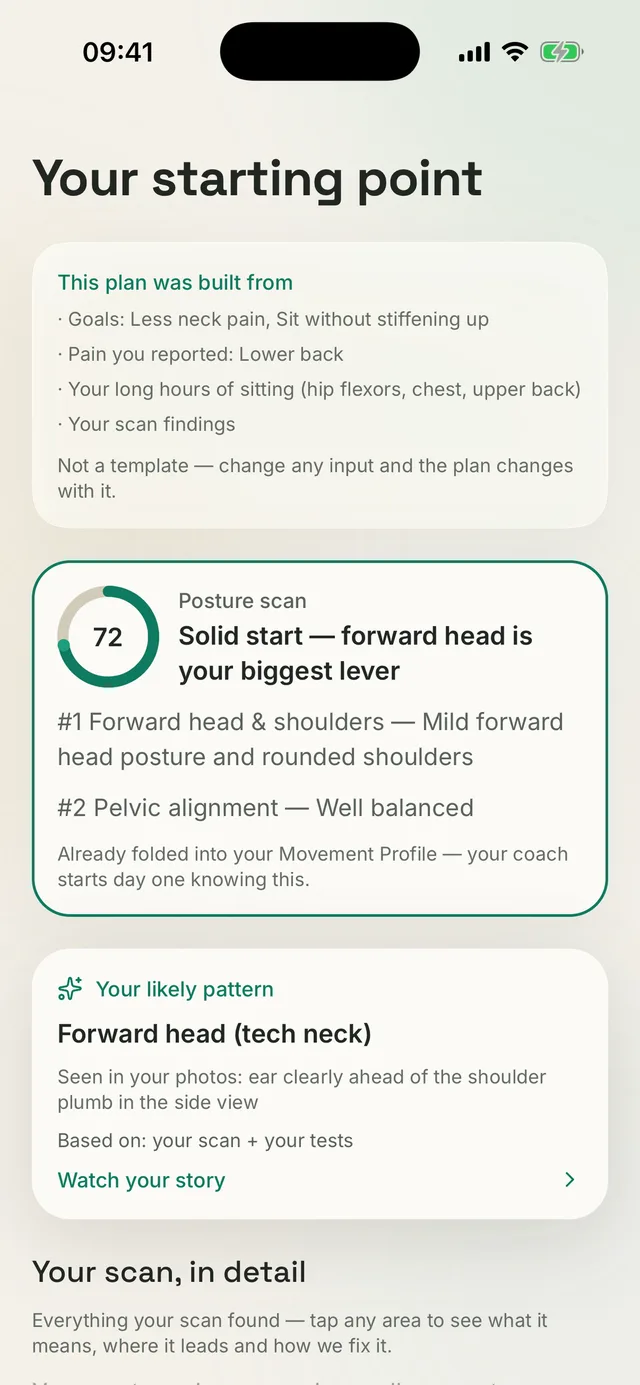
Initial analysis
The camera turns posture and movement into numbers.
A visual check cannot tell you exactly how far your head sits forward or how much your two sides differ. Kallen finds 33 body landmarks in each photo and calculates the angles of your head, shoulders and pelvis, plus the difference between left and right. Instead of “looks a bit tight,” you get a result in degrees.
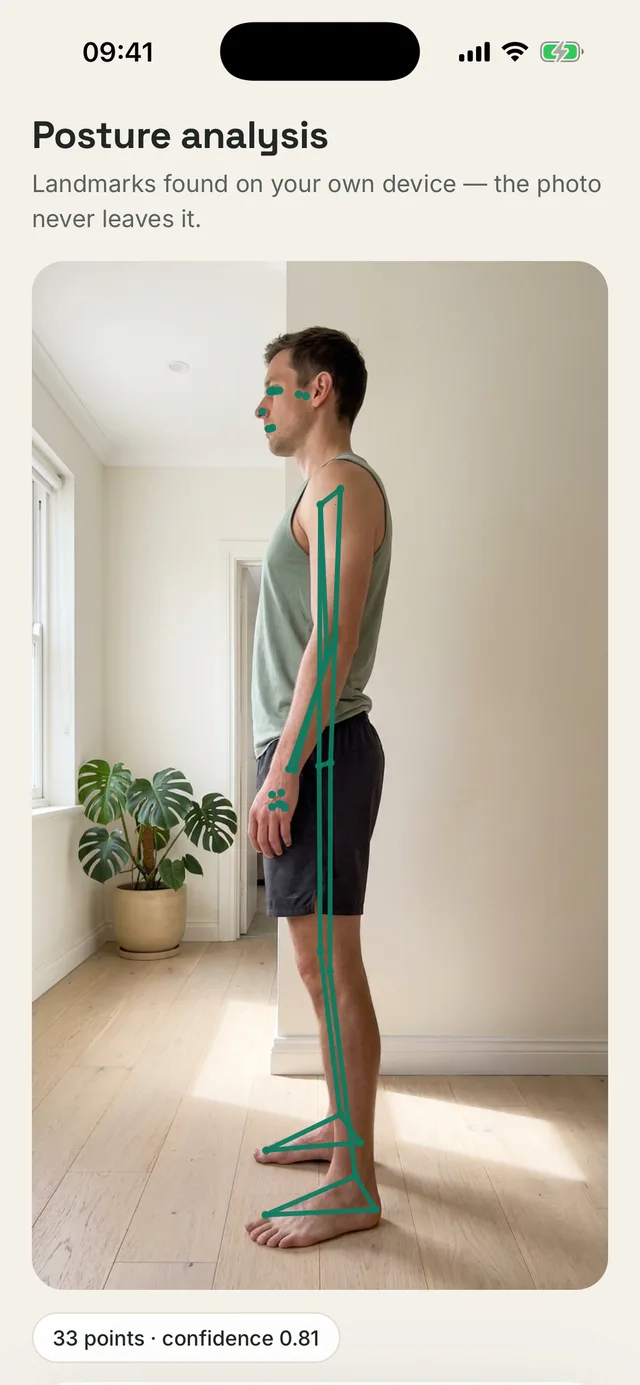
Posture analysis · side
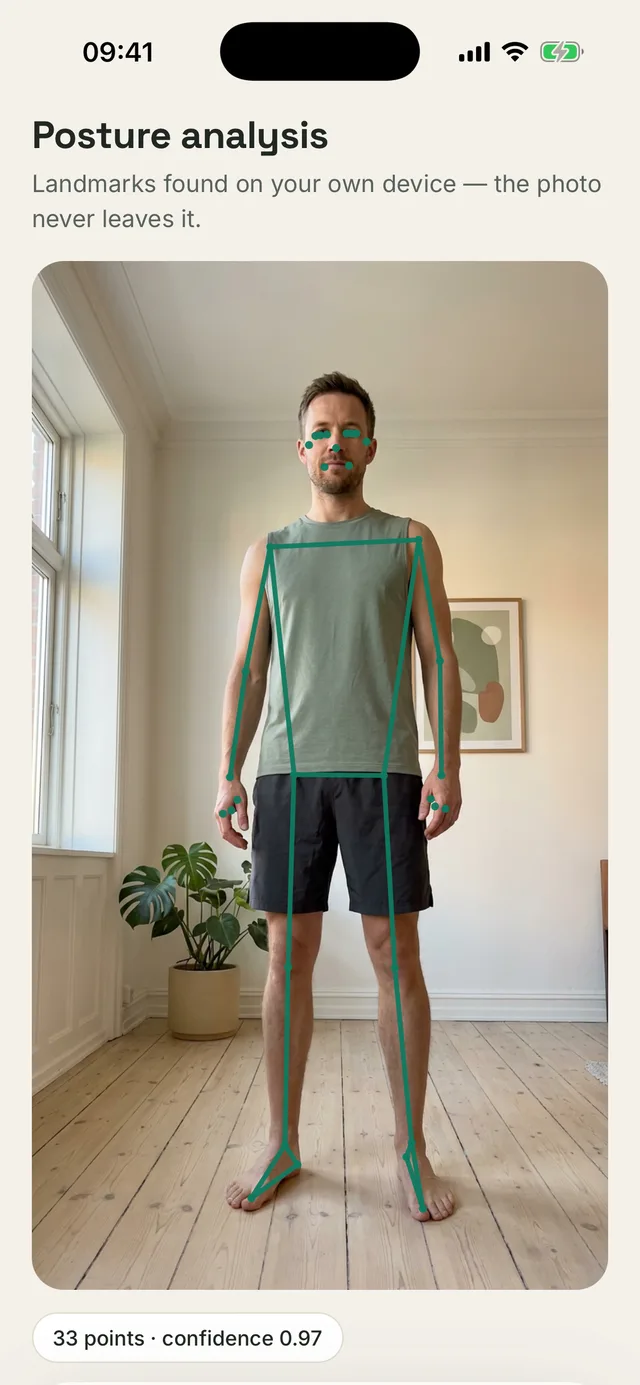
Posture analysis · front
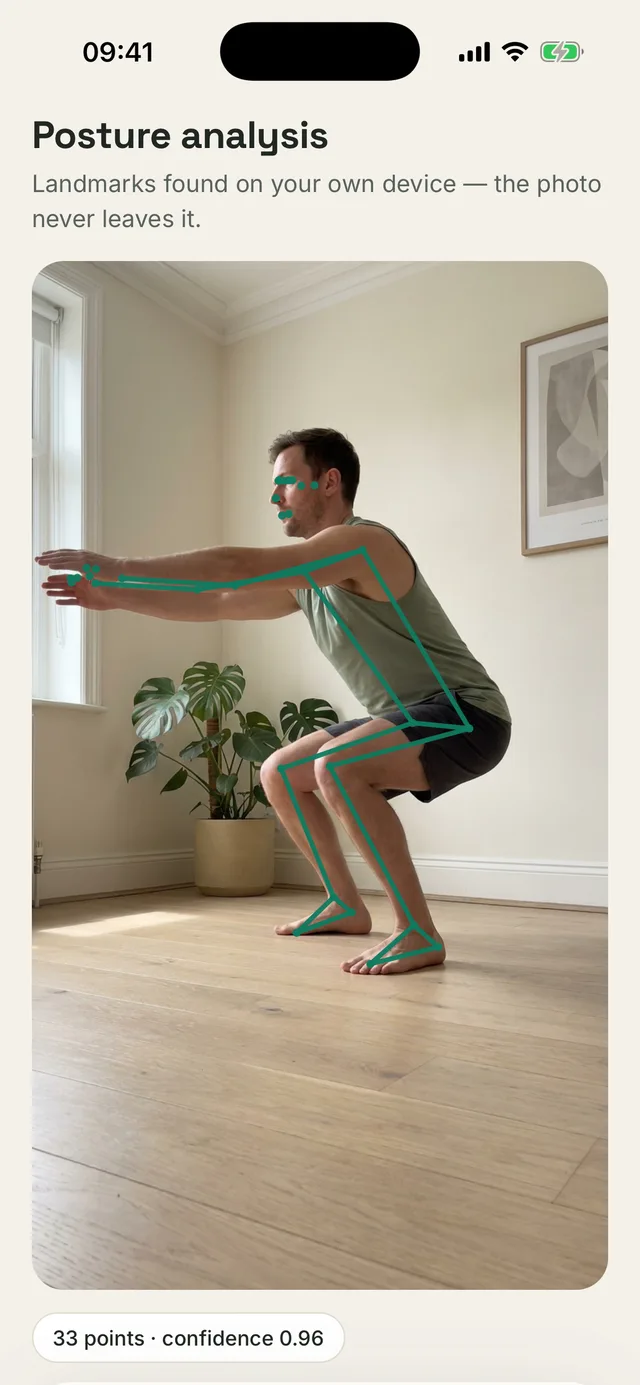
Range-of-motion test · squat
Initial analysis
01
Set down your phone and step back
Lean the phone against a wall or a book, then step back a few paces. You do not need someone to hold it or a tripod.
02
Kallen guides your position live
Real-time prompts show whether you are in frame, standing side-on and keeping the phone level. Kallen waits for the right position before starting the countdown.
03
It measures movement, not just a pose
During range-of-motion tests, joint angles are calculated frame by frame. The result reflects how far you actually move, not how you arrange yourself for a single photo.
Seven kinds of scan
Full posture scan
front, side and back in one assessment
Side posture photo
forward head, rounded shoulders, pelvic tilt
Front posture photo
shoulder and hip symmetry
Back posture photo
shoulder blades, spine line, heel position
Lower-body check
pelvis, knee valgus, feet
Feet and arches
arches, big-toe position, heel stance
Desk check
how you actually sit, and your workstation
Photos go to the server only while they are being analyzed. Our server keeps no copy.
Eight range-of-motion tests, measured by the camera
A range-of-motion test shows in degrees how far a joint actually moves, with the left and right recorded separately. A physical therapist measures the same range with a goniometer; here the camera measures it and shows you the result immediately.
Toe touch
55–110°
spine and hamstrings
Overhead reach
150–180°
shoulders
Deep squat
90–140°
hips, knees, ankles
Hip extensionL/R
5–20°
hip flexors
Side split
80–140°
adductors
Side bendL/R
20–40°
lateral flexion
Ankle bendL/R
30–45°
ankle and calf
Straight-leg raiseL/R
60–85°
hamstrings
The green section is the typical adult range used to grade your result. “L/R” means the test measures each side separately.
What happens to the reading
See what limits the movement
Kallen analyzes each test result on its own: what may be limiting the movement, how your body compensates and what you can do next.
Update your profile and 3D body map
Every reading updates your Movement Profile. Differences between sides appear on a 3D model you can rotate and inspect.
Re-test and compare
Repeat a test whenever you like. History and progress appear on charts, so you compare numbers rather than impressions.
Cause and effect
FIG. 03
Pain shows you where. Measurement helps explain why.
The place that hurts is not always where the problem begins. An ankle measurement saved in March can help explain knee pain in June when its side and date are still attached. For each painful area, Kallen checks possible sources of overload against your own results, one by one. It supports the time between appointments; it does not replace them.
The boundary
Kallen does not diagnose. Every protocol starts with signs that warrant an in-person assessment. When they appear, the coach says so plainly and continues to support you with what is safe in the meantime.
The weight of the line is the state of the hypothesis, not the severity of the symptom.
Here is how six of the 34 movement tests are measured. The first three match the green points on the map above.
Wall angel · upper back
Single-leg bridge · L/R
Ankle bend · 30–45°
Single-leg balance · L/R
Standing forward fold · hamstrings
Seated hip rotation · L/R
You start from your own numbers, not from a guess
You take posture photos and complete movement tests. The camera measures some; you do the rest with a guide and timer. One-sided movements are recorded separately for the left and right, in degrees and seconds. That reveals something a mirror cannot: how much range each side actually has.
Eight of the 34 movement tests are measured by the camera; the other 26 you run with a written guide and a timer. One-sided tests record the left and the right on their own.
Kallen connects results across the body
A painful area may be doing too much because another part of the movement chain is not doing enough. Kallen checks those possibilities against your measurements. An ankle result from March can help explain knee pain in June because both records still carry their side and date.
Fifteen body regions have their own list of possible causes above and below them in the movement chain. Each cause has a measurement that helps support or rule it out.
It also tells you what it does not know yet
Beside every cause sits one of three sentences: your reading supports it, nobody has checked it yet, or the measurement looks fine and it drops out. Nothing borrows certainty it has not earned. A test that would load the part that hurts is never offered, and a good reading older than six weeks goes back to be re-tested rather than passing for current.
If the two sides were measured more than four months apart, or one reading had low confidence, Kallen does not compare them. It will not name a difference it cannot support.
Six chains
01
Your knee hurts
We check the ankle
The knee can compensate for range the ankle does not have. When ankle bend is limited, the knee takes more of the work during a squat or while stepping off a curb.
The camera measures ankle bend for each leg separately. The typical range is 30–45°. The same reading can also help assess possible causes of heel pain.
02
Your neck hurts
We check the mid-back
A stiff mid-back stops giving up its share of the movement, so the neck has to do the extending every time you look up at a screen.
The seated rotation test and wall angel help check this, with each side recorded separately.
03
Your wrist hurts
We check the neck
Pins and needles in the hand do not always start at the mouse. Symptoms covering the whole arm can be referred from the neck, and tingling along the little-finger side is a different nerve again, compressed at the elbow. Three different trails, three different plans.
Before Kallen starts correcting how you hold the wrist, it asks for one test: neck rotation, each side on its own.
04
My back hurts when I bend. My hamstrings must be tight
The measurement says otherwise
Your straight-leg raise is 88°, above the entire typical band. Instead of immediately stretching the hamstrings, Kallen checks the mid-back. When it is stiff, the lower spine may take more of the bend.
Straight-leg raise: 88° against a typical 60–85°, so that hypothesis is ruled out. Mid-back mobility: 44/100, so that possibility remains.
05
My hip hurts at night when I lie on that side
Habits first, not stretching
The glute tendons pass over the bony point on the outside of the hip, the same bone you press into when lying on that side. Crossing your legs and standing with your weight on one hip increase that compression. Stretching the IT band can increase it further.
So the protocol starts by taking load off your everyday habits and only then builds strength. It also tells this pain apart from deep buttock pain, which flares when you sit, and from IT band pain, which shows up mid-run.
06
Deep buttock pain that runs below the knee and tingles
Here Kallen gives no plan
This does not follow the piriformis pattern, even though the symptoms can look similar. Ball release, pigeon pose and 90/90 belong to the first phase of that protocol, but could load an irritated nerve root. Kallen therefore does not open it.
The protocol’s differentials are explicit: pain running below the knee with tingling, or pain triggered by coughing, points to the nerve root rather than the piriformis. The safe next steps are walking within comfort, calming positions, breathing and an in-person assessment. Kallen still explains what you can do safely.
This is a sample layout. Yours will look different, but the labels and thresholds are the same ones used in the app.
Your plan
FIG. 04
A plan built for you. Not a template.
The weekly routine is the heart of Kallen. Your intake and measurements shape every exercise, set, rep and hold time. When the two sides differ, the plan can give the weaker side more work. Instead of the same routine as everyone else, you get one built for you.
What Kallen builds your plan from
What you tell it
Your goals, and how far you want to take them
How many days a week you want to train
Sports history, gym sessions, hours of sitting
Injuries, surgery and diagnoses
What it measures
Functional test results
Ranges of motion, measured by the camera
Your posture scan
Your left and right side, separately
What it works out
What is weak and what is too tight
Where it hurts, how much and when
Which side lags behind
What to avoid with your symptoms
Your plan
Example · Mon · Wed · Fri
Chin Tuck
catalog 3 × 10 →
3 × 5 s
↳ Side-on scan: head sitting forward of the shoulder line.
Upper Trap Stretch
catalog 2 × 30 s →
3 × 30 s per side
↳ Neck ache that builds through the afternoon.
Single-Leg Bridge
× 8 reps
↳ Left side weaker on the test: it goes first and gets more sets.
Half-Kneeling Hip Flexor Stretch
2 × 40 s per side
↳ Long hours sitting at a desk.
An example. Yours will be built from your own data.
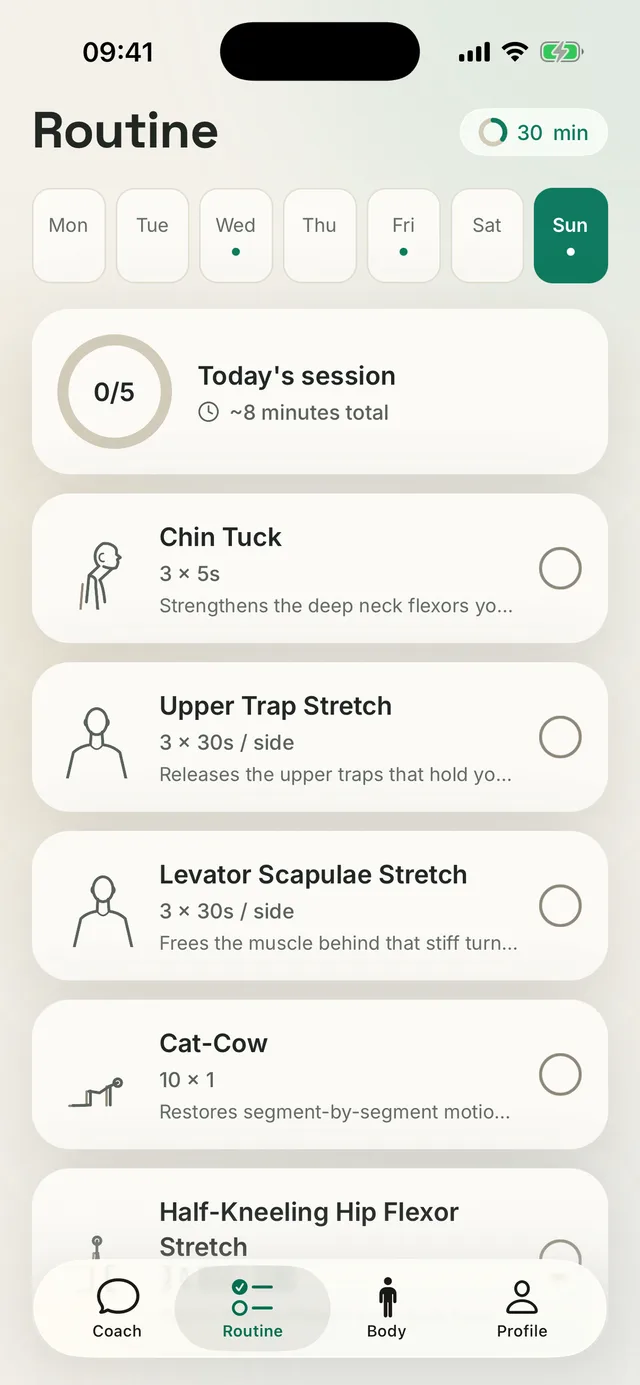
Weekly plan
Your week on one screen
Your training days, the dose for every exercise and today’s session time (about 8 minutes here), all in one place. Tap an exercise to learn why it is in your plan and how to do it.
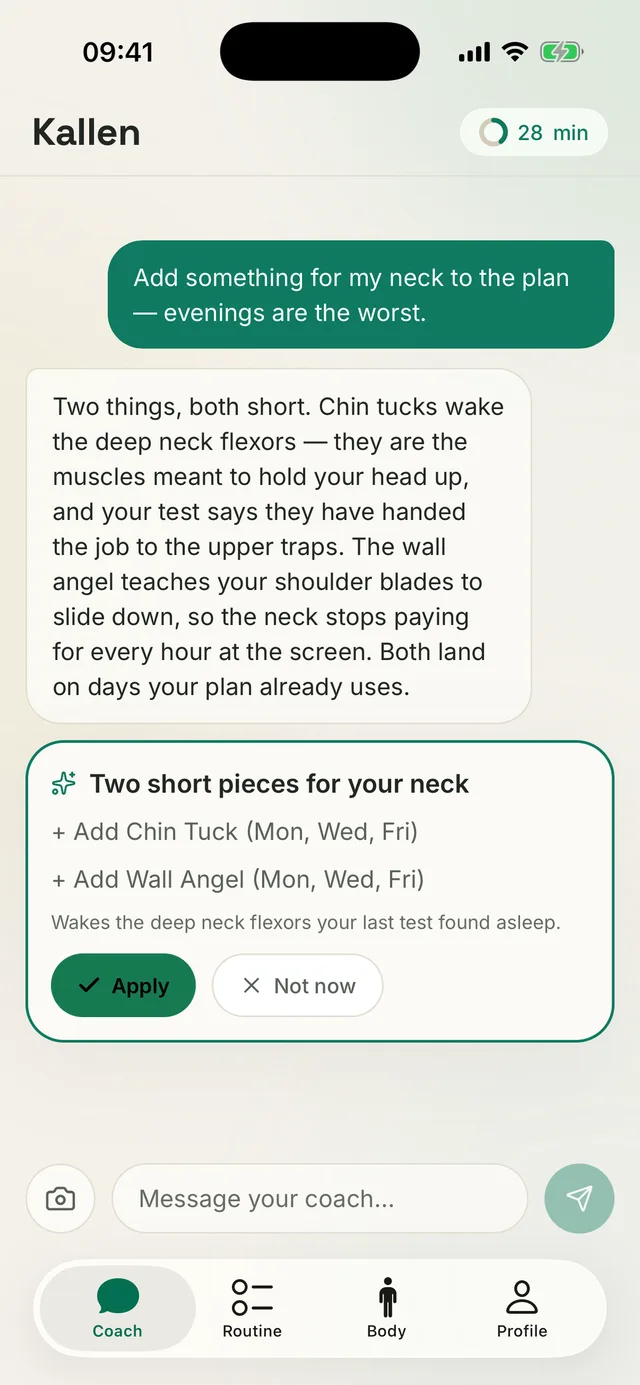
A plan change from the coach
The coach adjusts the plan. You decide.
Tell it what hurts or what you want more of, and the coach proposes a specific change: what to add, on which days and why. Nothing reaches your plan until you tap Apply.
What makes it different
| Compared | A typical exercise app | Kallen |
|---|---|---|
| Where the plan comes from | A preset program or a short quiz | A conversation with you, tests, a posture scan and measured ranges |
| Sets and reps | The same for everyone | Set for you, exercise by exercise |
| Left and right side | Both treated the same | The weaker side goes first and gets more sets when the tests show a gap |
| Pain, injuries, diagnoses | Usually outside the plan | Change which exercises you get and what to avoid |
| Why this exercise | Rarely explained | A reason written next to every exercise |
| A few weeks in | The same set as day one | The plan moves with your results |
What you get
A coach that remembers your measurements.
01
A conversation that updates your plan
The coach reads your profile and proposes a specific change on an approval card. Once you accept it, the change goes directly into your plan.
02
Protocols, not a pile of exercises
24 protocols for specific complaints, split into phases with a clear condition for moving on. A phase ends when you meet that condition, not when a week goes by.
03
Breaks that count
Reverse Sitting tracks the work blocks you choose and gives you a 40-second Mobility Snack after each one.
04
Stored on your phone
No accounts, no cloud, no sign-in. Your history, plan and pain journal stay in your phone’s own storage.
Common questions
Before you download
Q1
Is Kallen available on Android?
Yes. Kallen is on Google Play for Android 7.0 and newer, and on the App Store for iPhone. The measurements need the phone camera and a few meters of clear space.
Q2
How much does Kallen cost?
Kallen is free to download. The intake, posture scan and first plan are free too. On the free plan, you can complete each type of scan and camera measurement once a week. A monthly or yearly Kallen Pro subscription removes that limit. The App Store or Google Play shows the price in your currency.
Q3
What happens to my posture photos?
A photo goes to the server only for analysis, and the written result returns to your phone. Kallen has no accounts or cloud sync. Your Movement Profile, plan and pain journal stay in your phone’s own storage. Data does not move to a second phone automatically. On iPhone, it comes back with an iPhone backup if you keep one; on Android, it is not copied to your Google account. See the privacy policy for details.
Q4
Who is Kallen for?
Adults who want to move better and with less pain. Kallen helps people who want to stay fit and simply move more, athletes who want better mobility, a smaller gap between sides and fewer recurring overuse problems, and desk workers who feel it in the neck, shoulders, hips or lower back. If you are in rehab after an injury or surgery, Kallen helps you train consistently between appointments and track your progress, while your physical therapist decides how much load is right. Kallen is not a tool for treating posture problems in children.
Q5
Can Kallen replace a physical therapist?
No. Kallen works like an AI physical therapist within what a phone can do: it takes your history, measures, remembers your results and helps you follow your plan between appointments. It cannot examine you hands-on or make a diagnosis. Every protocol lists signs that warrant an in-person assessment. When they appear, the coach says so plainly and continues to support you with what is safe in the meantime.
Q6
How long until I notice a difference?
It depends on the complaint, so each guide gives its own timeline. For common desk-work problems, noticeable relief may begin after one to two weeks of movement spread through the day. Building the endurance that reduces flare-ups after a difficult week usually takes six to twelve weeks. You move to the next phase when you meet its criterion, not when a date passes.
Before you choose
The questions people ask right before downloading.
How to test your mobility at home, what AI genuinely measures, how posture apps differ, why reminders stop working, how to turn a pomodoro into a break your body notices, how to find which side is holding you back, and why pain keeps coming back.
01
Mobility tests at home
Eight range-of-motion tests and ten movement checks you can do at home, the normal range for each, and what a stiff ankle, hip or upper back can overload.
02
Fixing posture with AI
See how AI supports posture work with camera measurements, side-to-side comparisons and a plan that adapts to your results. Know its limits before you begin.
03
Choosing a posture app
Six checks before you pay for a posture app: measurement, plan changes, left–right comparison, red flags, privacy and dosing, plus where Kallen falls short.
04
Posture reminders
Posture reminders fade into the background within a week. Why a short break with a ready-made movement beats one more prompt to sit up straight.
05
Movement pomodoro
Pomodoro protects your focus but does not tell you what to do during the break. A micro-exercise timer fills it with one short movement matched to you.
06
Asymmetry and tightness
How to measure your left-to-right difference at home, why a mirror will not show it, and what to do with the result before you stretch anything.
07
When pain comes back
The ache fades, then returns to the same spot weeks later. Learn the three reasons this can happen and how to compare possible causes with your own measurements.
Guides
Understand what may be driving the problem.
These guides use the same protocols as the in-app coach. They cover common symptoms and possible causes, flag signs that need professional care and show the plan phase by phase.
01
Tech neck: neck pain from screen work
The ache builds through the workday, turning your head to check a blind spot pulls, and weekends are noticeably better.
02
Forward head posture
In a photo from the side your ear sits clearly in front of your shoulder, and by evening your neck feels like a plank.
03
Rounded shoulders
Your shoulders roll forward, and your relaxed hands turn until the knuckles point ahead.
04
Anterior pelvic tilt
A pelvis tipped forward deepens the curve in your lower back: the belly pushes out even on a lean frame, and after a while on your feet the lower back may start to ache or pull.
05
Lower back pain from sitting
The ache builds after long sitting or bending, eases once you start moving, and comes back in episodes.
06
Thoracic spine stiffness
Twisting to look behind you in the car meets resistance, and when you try to straighten up the movement happens in your lower back instead of your mid-back.
07
Tight hip flexors
The first steps after standing up from your desk feel stiff, and the front of your hip pulls when you try to stand tall.
08
Tension headaches from the neck
It starts at the base of your skull and tightens like a band, usually in the afternoon after a day on screens.
09
Plantar fasciitis (heel pain)
The first steps out of bed feel like stepping on a stone, the pain fades as you walk around, and it is back after a long stand or the next morning.
10
Kneecap pain (stairs and sitting)
Going downstairs hurts more than going up, a long film or flight leaves the front of the knee aching, and deep squats are out of the question.
11
Shoulder pain (rotator cuff)
Reaching for a high shelf, the seatbelt or a bra clasp brings a pinch at the front or side of the shoulder, and lying on that side at night is uncomfortable.
Check your own results
Measure your range of motion in Kallen, build your Movement Profile and follow the plan step by step.
No account. Your data is stored on your phone.
guided exercises
89
movement tests
34
care protocols
24
accounts needed
0