
Kallen
Download

How to choose a posture app

Most posture apps combine exercise videos with reminders. That may be enough if you simply want to move more often. If you have a specific ache or a problem that keeps returning, look for a tool that measures progress and adapts the plan. These six questions will help you choose before you pay.

Solutions

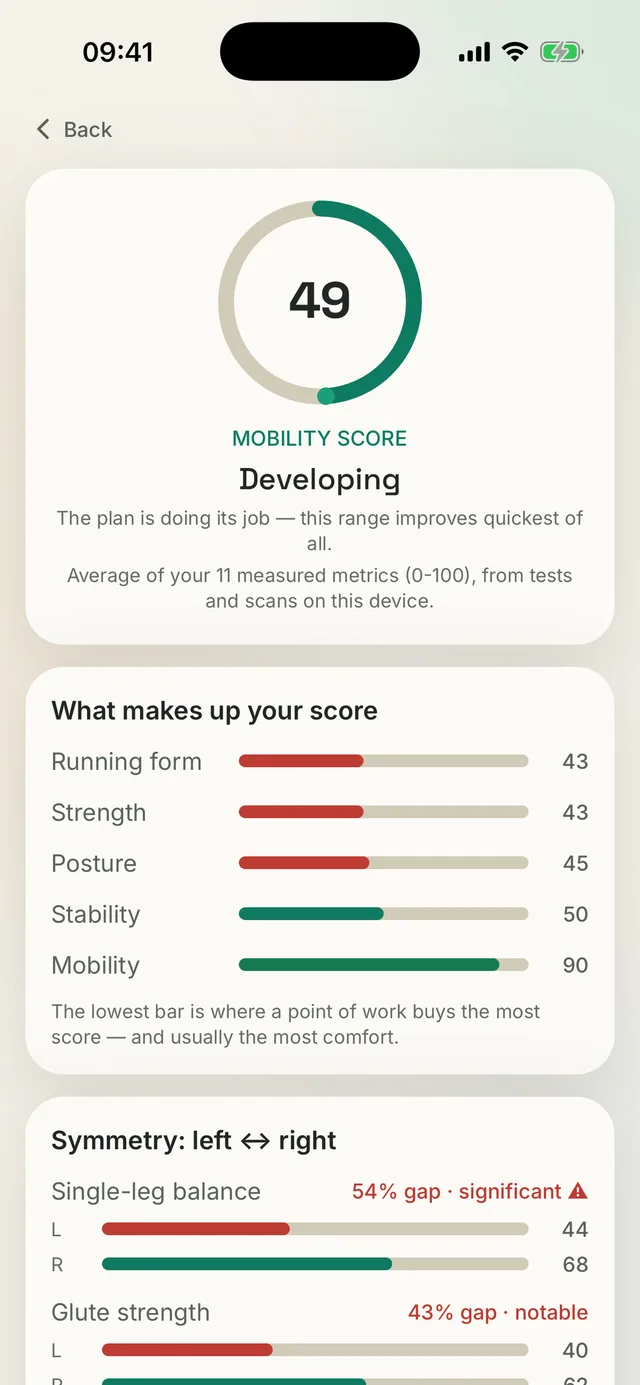
Kallen app screen: the mobility score with badges and a left-to-right comparison

Six questions before you choose

Start with the first two questions. They reveal whether an app responds to your results or simply plays the same content.

  • Does it measure anything? A questionnaire can describe your situation, but it cannot show your movement baseline.
  • Does the plan change when your results change? After six weeks, will you see something different from day one?
  • Does it compare your sides? A repeatable side-to-side difference can help identify a useful starting point.
  • Does it tell you when to see a professional? Pain content with no red-flag list is a serious mark against it.
  • What happens to your data? Posture photos are sensitive. Check whether the app requires an account and what leaves the device.
  • Are the dosages conservative? You train unsupervised, so aggressive “stretch to the max” cues are a bad sign.

89

guided exercises

34

movement tests

24

care protocols

How Kallen measures up

Kallen is built around the first three points. Camera-measured range-of-motion tests produce results for both sides, the Movement Profile keeps the history, and the coach proposes plan changes when the data supports them. It includes 24 protocols for specific complaints, each with red flags and a criterion for advancing. There are no accounts or cloud sync, so the data stays on the device.

Who Kallen is not for

If you only want to play a ten-minute stretching video without answering questions or taking measurements, Kallen is not the right fit. If you have a fresh injury, neurological symptoms or a diagnosis that needs supervised rehabilitation, start with a professional. Kallen will make that boundary clear. The app is available on iPhone and Android.

Common questions

Are free posture apps good enough?

For reminders to change position and a handful of exercises, usually yes. If you want to know what is limited and whether it is improving, you need measurement and history rather than a video library.

How can I tell an app genuinely adapts?

Your plan looks different a few weeks in, and the app can say why it changed. If every test leaves you with the same exercise list, the personalization ended with the sign-up questionnaire.

Is a posture app worth it for desk work?

Yes. Loading patterns from sitting are repetitive, respond well to regular movement and can be measured. The important part is bringing movement into the day instead of saving it all for one evening session.

Specifics

Short answers, with numbers

Concrete answers to the questions people ask right before downloading.

01

Which posture app should I choose if I have a specific ache rather than just wanting exercises?

Choose an app that measures before it builds your plan. A questionnaire describes your situation, but movement results establish your baseline. Kallen uses 34 movement tests and 7 kinds of scan, with 24 protocols for specific complaints. Each protocol has its own red flags and a capability to reach before the next phase.
02

Are free posture apps good enough, or is a subscription worth paying for?

Free is usually enough for reminders to change position and a handful of exercises. Measurement and history matter when you want to know what is limited and whether it is improving. Kallen is free to download, while a Pro subscription lifts the weekly cap on new scans and re-tests.

03

Is there a posture app that needs no account and keeps my data off the cloud?

Kallen has no accounts and no sync. Your Movement Profile, plan and pain journal stay in the phone’s storage with no copy on a server. Only the photo being analyzed and the coach’s conversation context are sent for the duration of that request. Kallen is available on iPhone and Android.

Inside the app

Check it against the screens before you pay

A store listing cannot prove that an app measures you or explains its plan. These two screens can.

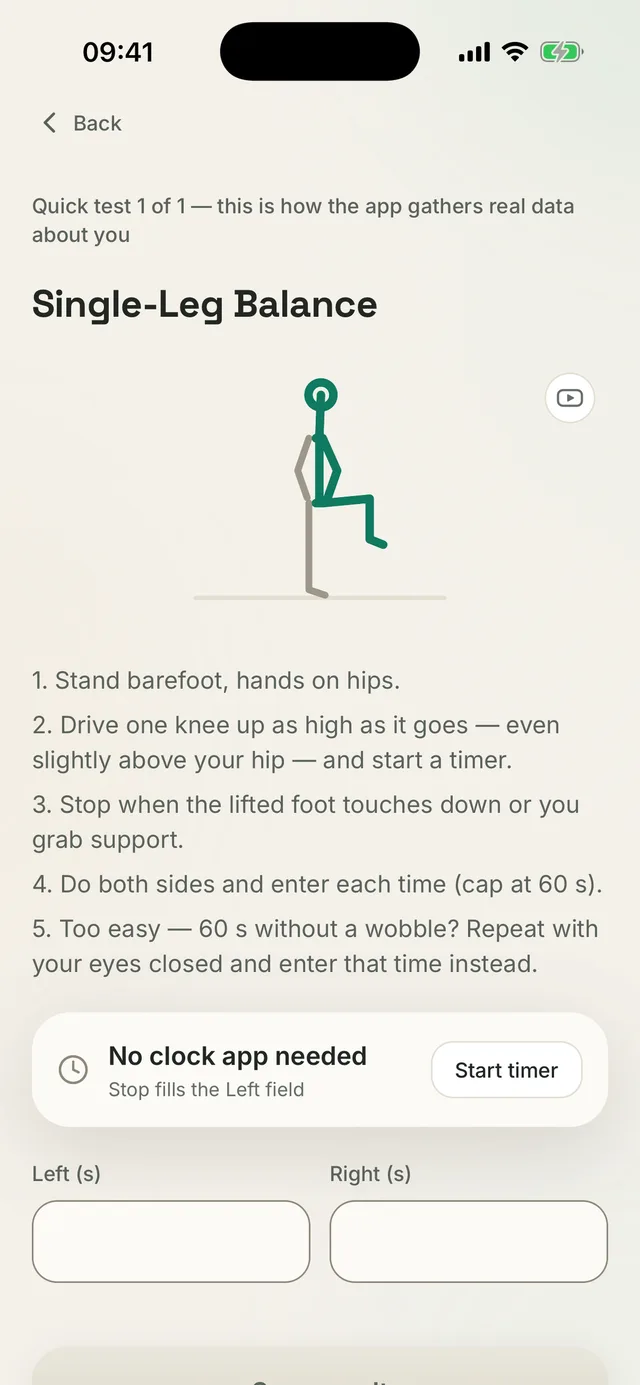
Kallen app screen: the single-leg balance test with steps, a built-in timer and separate fields for the left and right side

Check 1: does it measure anything

Single-leg balance, a timer built into the app, a result stored per side. Without a measurement there is nothing to compare a month from now.

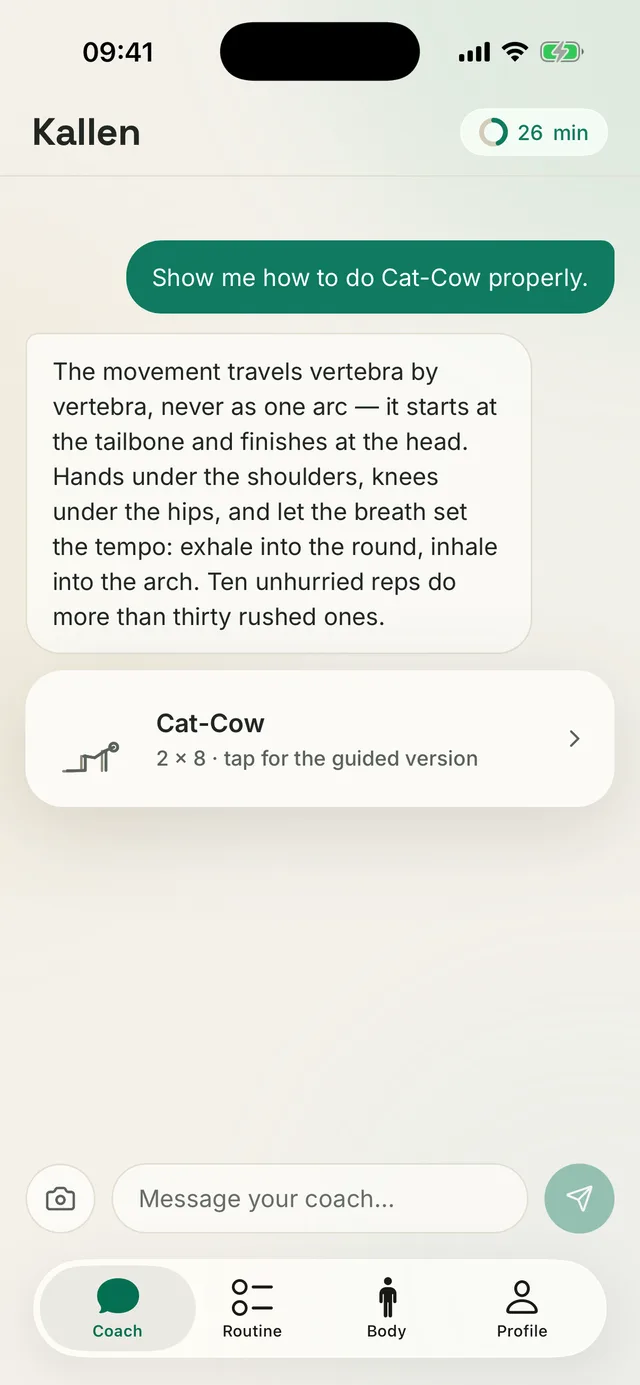
Kallen app screen: the AI coach explaining Cat-Cow technique and attaching an exercise card dosed at 2 × 8

Check 2: can it explain its plan

Ask why an exercise is in your plan and get the reason together with the technique, not another generic list.

Check your own results

Measure your range of motion in Kallen, build your Movement Profile and follow the plan step by step.

Download Kallen

No account. Your data is stored on your phone.